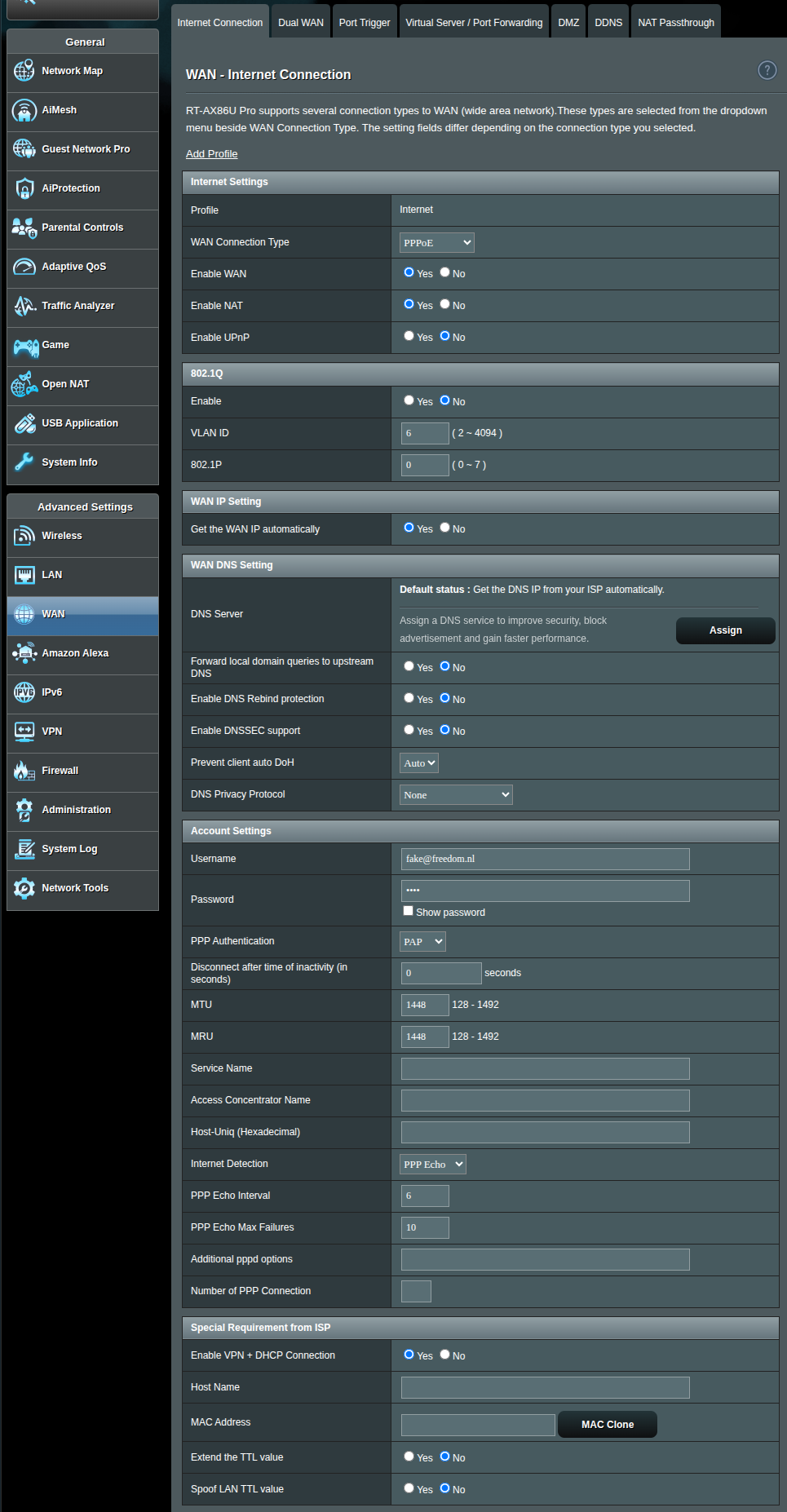
I would like to configure my existing ASUS router (RT-AX86U Pro running Merlin FW) to use with my Freedom Fiber subscription.
I had been using this router for some years when I was still a client from Odido without any problems.
I have been following the documentation of Freedom themselves to configure my WAN connection, as well as some topics in this forum (albeit for other ASUS models, namely the RT-AX88).
Below is the current configuration (and I don’t have internet right now). Could anyone - perhaps with experience in these ASUS routers - have a look? I’ve tried so many different things, don’t really know where to go from here. Any help is much appreciated.
For context, this is how the network looks like (up till router/modem):
Fiber from outside → Huawei ONT (on LAN1) →ASUS RT-AX86U Pro (WAN).
The Huawei ONT is the one provided by Freedom, and is correctly registered (PON LED is stable and Freedom states they can “see it”). And I have a stable 1Gbps connection between my ONT and the ASUS.
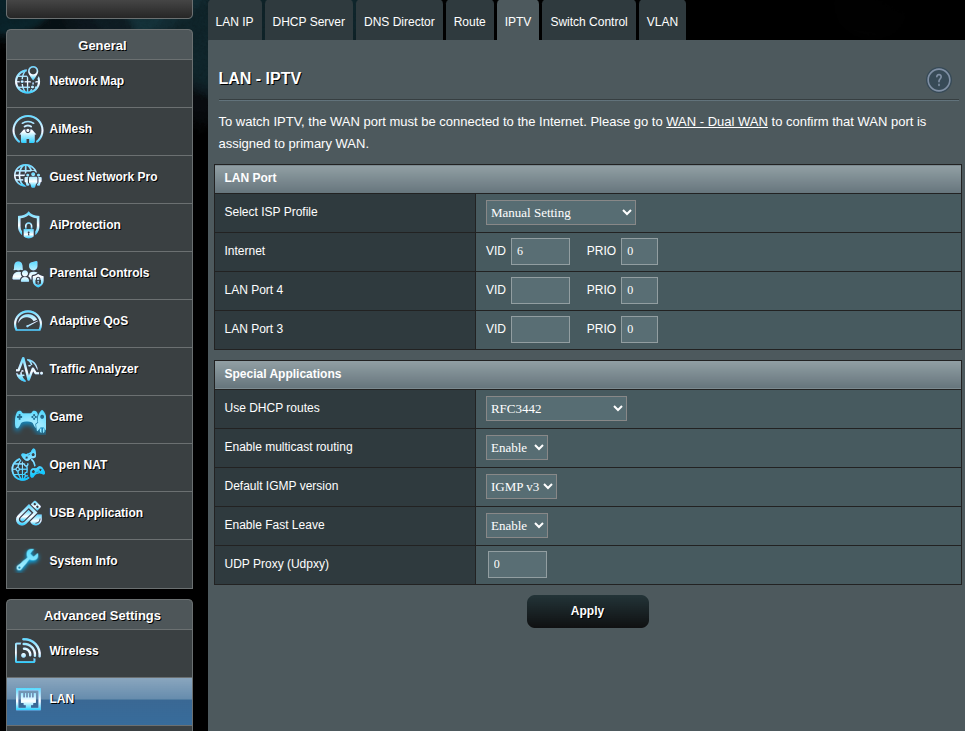
The IPTV VID set to 6 for internet is because I was not sure where to put that (if in WAN or LAN). In other similar posts of people using ASUS routers they put the VLAN ID in the LAN-IPTV tab. To be clear, I don’t have IPTV with Freedom, only Internet.
Looking at the logs, I can’t find anything on the login process, but pppd (which I believe is the PPPoE daemon), reports a timeout waiting for PADO packets every minute or so.
Ah, and I get an IP on my WAN connection, but it is not the same I received by email from Freedom when I subscribed the internet service…
Yes, I enabled 802.1Q in the WAN menu, with VLAN 6. Still didn’t work.
I am running out of ideas and I am a bit disappointed as I read people got the AX88U Pro working as their own router, which is rather similar to the AX86U Pro (mostly same hardware)
Ensure the cable between Router-WAN (Blue) and ONT is operational.
For this, check the “Visualised” [ Network Map] overview.
To ensure things we’re on the same page and exclude other (re/try) settings interfere:
Reset the router back to factory (and finish initialisation wizards).
Go to [WAN] → [Internet Connection] :
Activate WAN section PPPoE
Enable (yes) 802.1Q with for VLAN 6.
In Account section (fwiw):
3a. Username: fake@freedom.nl
3b. Password: 1234
3c. PPP Authentication: PAP
Check system/report log for PPP/PADx message progress.
Be patient and give it a few minutes.
If no progress of change in (log)messages, something else (perhaps outside your set-up) might be the culprit.
To exclude any ASUS/settings as possible cause, consider using (or borrow) a FritzBox.
Optionally if your are confident with things, try to connect the Ethernet-port of your PC to the modem and configure te PC interface in PPPoE mode (using settings as stated earlier), search internet for assistance, for example (not my site):
I was just preparing to connect the UTP cable to my Linux laptop directly to try and connect via PPPoE from it, and when I picked up the ONT I noticed that the UTP cable was connected to LAN4 and not LAN1.
As soon as I connected it to LAN1 it worked immediately. 900Mbps/800Mbps as per the first measurement.
For future reference: the configuration shown in the first image is correct, with the exception that 802.1Q needs to be Enabled. And all VLAN settings in the IPTV tab under LAN are OFF.
Please note that Maximum Segment Size (MSS) is something else as Maximum Transmit Unit (MTU) or Maximum Receive Unit (MRU)
MSS is only applicable on TCP-traffic. The advice to set it to 1448 is a compromise in case your router does not support RFC 4638 [1] or if you happen to use a ZTE ONT on Fiber Crew’s network.
Here is how we got to an MSS of 1448 bytes:
Standard Ethernet Limit: 1500 bytes
802.1Q VLAN Tag: -4 bytes
PPPoE Header: -8 bytes
IP Header: -20 bytes
TCP Header: -20 bytes
Resulting MSS:1448 bytes
Now, most modern ethernet devices keep the 801.1Q VLAN header outside the payload, so that is for debate. Perhaps the pesky ZTE ONTs could not even handle that but I am not sure.
At any rate, best to see if you can get your device to support RFC 4638.