Het blijkt een storing te zijn bij mijn leverancier van de zonnepanelen waarom ik geen connectie met de datalogger en server heb.
Storing verholpen door de leverancier Zelfstroom. Was handig geweest als ze hun klanten gemeld hadden dat het een storing betrof die alle klanten trof. Toevallig dat het optrad na update Fritzbox en ik dus meteen de nieuwe firmware als oorzaak zag.
Sinds gisteren af en toe de melding geen internet verbinding via wifi gaat over op mobiel data 5G. Duurt een seconde en de internet verbinding via wifi is terug.
En in het logboek van de fritzbox, iets te zien?
Niets te zien of er internet verbinding is verbroken. Bij wifi alleen 1 apparaat dat steeds wordt afgemeld en dan meteen weer aangemeld. Is een hotspot voor mijn radio hobby. Maar ik merk daar niets op van onderbrekingen van internet verbinding. Maar geen meldingen in de log van Iphone of iPad waar de melding op kwam dat er werd overgeschakeld naar mobiele data/
Update 5590 7.90-114097 Labor
Info
Improvements of FRITZ!OS within FRITZ!Labor 7.90-114097
Internet:
- Change The number of devices for which information on utilization of the internet connection can be saved is limited to 20
- Fixed FRITZ!OS devices were shown and could be selected in the Online Monitor
- Fixed In some scenarios it was not possible to access the Online Monitor (Backend Fail: API SCGI error)
- Fixed In the Online Monitor, information on the validity of IPv6 addresses was missing
- Fixed The “Reconnect” function was not available for the internet connection if it was established via an external modem or external router
- Fixed The internet connection was reestablished if the IP Block List was edited
- Fixed Utilization of the internet connection by devices registered with the guest access was not displayed in the Online Monitor
Home Network:
- Fixed “Online time exhausted” was displayed in the details for a network device although internet use was not restricted
- Fixed With Lab versions, the FRITZ!OS version shown in the details for a network device with FRITZ!OS (Mesh Repeater) was incomplete
Update 5590 7.90-114673 Labor 25-07-2024 15:15
Info
Improvements of FRITZ!OS 07.90-114673
Internet:
- Change In VPN connections via IPSec, AES-192 is no longer supported as encryption algorithm in phase 2 SA
Improvements of FRITZ!OS within FRITZ!Labor
Internet:
- Fixed In certain scenarios, a home network device was sometimes assigned 2 active ULAs (Unique Local Address, IPv6)
System:
- Fixed The push service “Wi-Fi guest access” could be edited on Mesh Repeaters although the Mesh Master settings are to be adopted for this push service
USB:
- Fixed The NAS function could not be disabled
Improvements of FRITZ!OS 7.90-114591
Internet:
- Improved During the initial configuration behind a fiber optic modem (ONT), a relevant message appears if the network cable is not connected
Update 5590 7.90-114788 Labor 02-08-2024 14:18
Voor de 5530 zijn de wijzigingen hetzelfde.
Info
Improvements of FRITZ!OS 07.90-114788
Wi-Fi:
- Fixed Repeaters that were logged into the guest network were not marked as “Wi-Fi guests”
Improvements of FRITZ!OS within FRITZ!Labor
Internet:
- Fixed After enabling DNS over TLS (DoT), manually configured DNS servers without DoT were not visible in the Connection Details
- Fixed Home network devices with Neighbor Solicitation activated (depending on the operating system) could not use WireGuard® IPv6 VPN connections
- Fixed Under certain circumstances, VPN connections were not displayed in the Mesh Overview
- Fixed Under certain circumstances, updating IP addresses failed for accounts of the DynDNS provider “NO-IP”
Wi-Fi:
- Fixed On the page “Wi-Fi > Wi-Fi Channel > Use of the Wi-Fi Channels” the marking of channels blocked by radar was missing
Update 5590 7.90-115040 Labor 14-08-2024 16:07
Info
Improvements of FRITZ!OS 7.90-115040
Internet:
- Fixed Under some circumstances the network traffic of a connected telephone system was not routed via a specially configured VoIP interface
USB:
- Fixed In certain constellations, access to NAS contents via download link was not possible
Improvements of FRITZ!OS within FRITZ!Labor
Internet:
- Change Saving the data for the internet utilization of individual network devices is no longer automatically preselected (change does not apply to network devices for which this was already enabled)
- Fixed After enabling DNS over TLS (DoT), manually configured DNS servers without DoT were not visible in the Connection Details
- Fixed Under some circumstances it was not possible to set up a WireGuard® VPN connection directly after setting up an IPSec VPN connection
Wi-Fi:
- Improved Increased stability (FRITZ!Box 7590 AX)
Home Network:
- Fixed In the overview of network connections, very long names of network devices were not displayed correctly
System:
- Fixed Push Service for Wi-Fi guest access occasionally did not work with repeaters combined in the Mesh
- Improved Stability
- Improved Translations added
Improvements of FRITZ!OS 7.90-114970
Wi-Fi:
- Change Text for selection “WPA2+WPA3” removed
Improvements of FRITZ!OS within FRITZ!Labor
Internet:
- Fixed PCP-Portrange not visible in online monitor on PCP-connections
Improvements of FRITZ!OS 07.90-114788
Wi-Fi:
- Fixed Repeaters that were logged into the guest network were not marked as “Wi-Fi guests”
Improvements of FRITZ!OS within FRITZ!Labor
Internet:
- Fixed After enabling DNS over TLS (DoT), manually configured DNS servers without DoT were not visible in the Connection Details
- Fixed Home network devices with Neighbor Solicitation activated (depending on the operating system) could not use WireGuard® IPv6 VPN connections
- Fixed Under certain circumstances, VPN connections were not displayed in the Mesh Overview
- Fixed Under certain circumstances, updating IP addresses failed for accounts of the DynDNS provider “NO-IP”
Wi-Fi:
- Fixed On the page “Wi-Fi > Wi-Fi Channel > Use of the Wi-Fi Channels” the marking of channels blocked by radar was missing
Alles is nu vertaald naar Nederlandse taal. Geen delen meer in het Duits. Ik merk geen problemen met de 5590.
Nieuwe modellen IFA 2024
Zie ook: IFA 2024 | AVM Nederland
Alleen jammer dat die prijsvraag website na de eerste vraag geen teksten meer laat zien
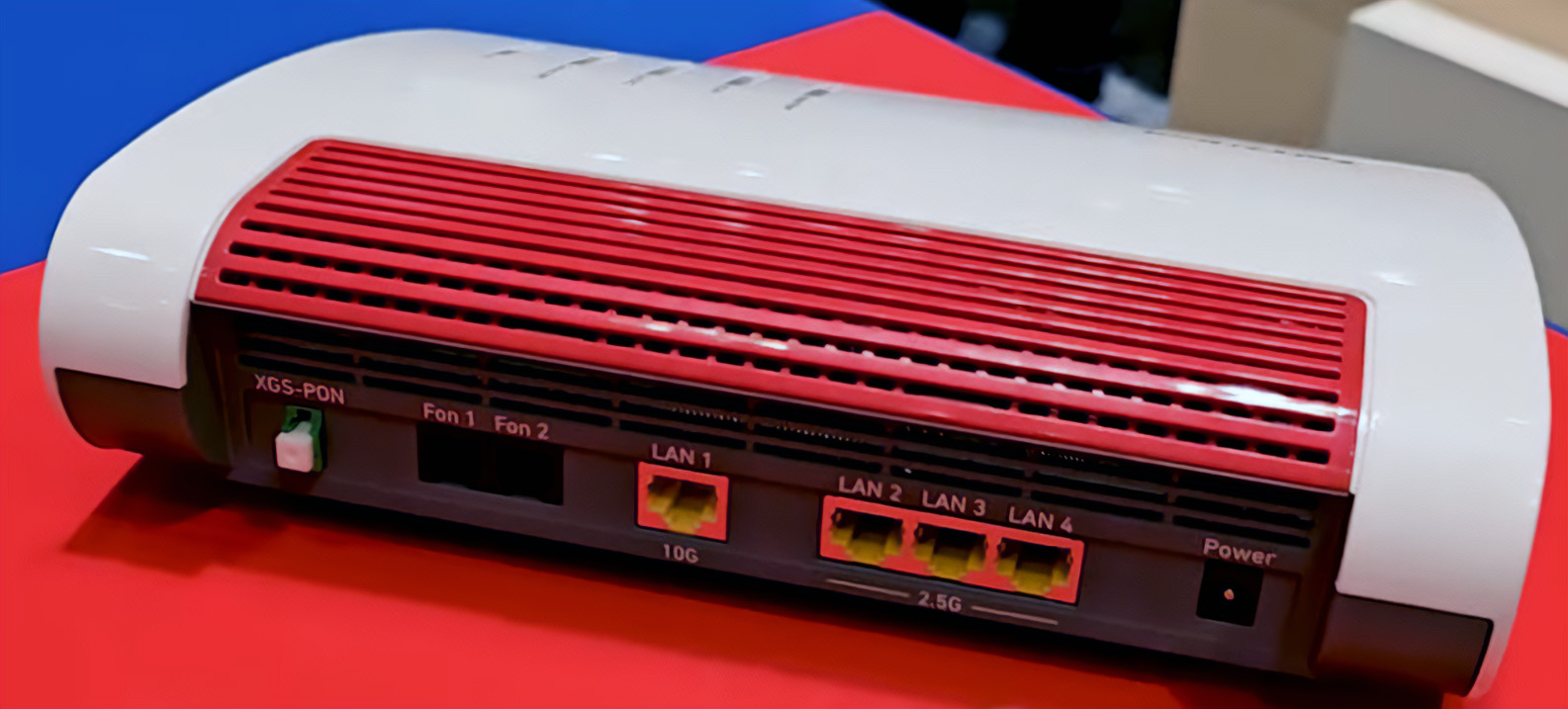
On topic: de 4690 is een flinke sprong voorwaarts, ik zou bijna zeggen dat ik de 7690 te snel gekocht heb. Bijna want nadat deze aangekondigd werd duurde het bijna 2 jaar voordat je hem daadwerkelijk kon kopen.
Maar het is een vlaggenschip, die 4690: 10G Wan, 10G Lan en 3x 2,5G Lan.
Alleen jammer dat die prijsvraag website na de eerste vraag geen teksten meer laat zien
Het is helaas nog steeds niet gerepareerd.  ik wil ook wel eens wat winnen!
Bij mij begon de vragenlijst ineens in Engels.
En ook hier na vraag-1 geen tekst meer … …
zojuist dit euvel gemeld aan AVM-support;
ben benieuwd … …
( hun antwoord zet ik natuurlijk ook hier )
binnen één dag krijg ik netjes NL-antwoord van @AVM op mijn (brakke)Duitstalige vraag :
En de prijsvraag werkt weer, ik heb m al ingevuld 